Showing posts with label Burlington High School Student. Show all posts

Tuesday, March 12, 2013

Day 92 - Dominic Calicchio, Burlington High School Senior

Architecture Students Learning Outside the Classroom:

Today my architecture class visited Bergmeyer Associates in Boston. At Bergmeyer and Associates we met Daniel Ricardelli, a former student of our teacher, and he told us a lot about how much he loved architecture. Also, he told us about his journey through and after high school and gave us a lot of information about what he does on a daily basis and what he plans to accomplish. We also met Bill Spaulding who took us on a tour of their space. He explained everything from wall colors to specific jobs he does on a daily basis. Also, he told us a little more about the company. He told us about their clients and past projects they've even completed in our hometown, along with LEED buildings they've worked on and are extremely proud of. Lastly, we met Janet Tatten who told us what we need to do to make a good impression and hopefully one day get an internship or even a paying job with companies like Bermeyer and Associates.

Later my class walked over to theBoston Society of Architecture, or the BSA Space. Here my class enjoyed looking at visual artwork that was displayed. Mary Fichtner gave us a tour of their galleries and everything was amazing. In a short period of time she showed us a great deal of artwork and I really enjoyed everything I saw. My class was inspired by small models of buildings and we cannot wait to get started on our own models later in the year.

Picture


Picture
  Overall, Boston is a great city when studying architecture. The views of both spaces we visited were both beautiful and inspiring. It must be a little easier to work as an architect when your surrounded by so much of it in Boston to inspire you. I learned a lot about the daily routines of architects as well as the process it takes to become one. I loved this field trip and had an amazing time!

Wednesday, February 13, 2013

Day 79 - Burlington High School Students

Burlington High School Poetry Out Loud Finals!:
Check out the amazing performances from our BHS students in this year’s Poetry Out Loud Finals! Thanks to BHS English Department Head and the entire English Department for their efforts in another amazing year of Poetry Out Loud at BHS!

Congratulations to this year’s winner Allie Hardy!


Enhanced by Zemanta

Monday, January 14, 2013

Day 59 - Yash Kamani, Burlington High School Sophomore

Cleaning Up Your Digital Identity: A Student’s Perspective

Large Man Looking At Co-Worker With A Magnifying Glass

As Students, we always hear parents, teachers and other adults lecturing us about what we post online. Or, more importantly what we shouldn’t be posting online. We tend to take what they say with a grain of salt. We half listen, half don’t… and when it comes down to it we tend to forget what we’ve been taught and end up posting something that we later regret. No matter what you want to do after high school your digital footprints are going to catch up with you. Colleges will look for you, possibly employers will check you out, and the military and armed forces will also track your online identity.

So you’ve already made a couple of mistakes. Now you know… but you still have those old posts up there somewhere on the world wide web. You don’t want these to come back and haunt you? Here are some tips to clean up your digital identity.

1. Google Search yourself

Logout off of all your accounts if you are logged in on your web browser (emails, facebook, twitter, anything else that you have an account for). After this just type in your name in Google and check what comes up. If there’s something there that you’re surprised to see, or that you wish wasn’t up there you may be able to do something about it.

2. Facebook Privacy Settings

If you are able to see a link to your facebook account when you google your name, your privacy settings may not be as strong as one may desire. If you are under 18, your facebook profile shouldn’t come up on the web. Facebook automatically sets profiles of minors to at least a “friends of friends” privacy setting. This means that at the max, only friends of friends of you will be able to see what you post, send you a message or poke you.
If you still see your facebook account pop up when you search your name, this is probably because you lied about your age when you created your facebook account in order to be eligible to make one. (Facebook is only open to users 14 and up, to evade this many kids lie about their birth date). So now, Facebook thinks you are an adult and doesn’t feel the need to protect you.
  1. To change your age on facebook, navigate to your profile,  and click on “update info”
  2. Under the “Basic Info” section, there should be a “Birth Date” section. Enter your correct birth date
  3. Click Save
Now, even if you CAN’T see your facebook profile on a search engine (Google), your privacy settings still may not be as strong as you wish. If you navigate back to the “Privacy Settings” you will be able to select settings for each and every aspect of Facebook. You can select who you want viewing what you post (Friends, or Friends and Friends of Friends). You can even customize this section with specific names. The safest and most secure option would be to select “Just Friends” for all of the Privacy settings.

3. Look through your timeline

The new facebook timeline makes it easier than ever to look back at your old statuses, pictures, or posts of any kind. Simply take a little time to scroll through your timeline and delete or remove anything you don’t want there or find inappropriate now. It may not be too late to fix a mistake.

4. Twitter

Twitter’s privacy settings are very simple. You’re either private or you’re public. Only two options. Either everyone in the world with internet access can see your tweets (they don’t even need to have a twitter account) or only selected people who you approve to follow can view your tweets.
To select your privacy settings on twitter
  • navigate to twitter.com and log in with your twitter handle
  • click on the gear icon in the top right hand corner,
  • select “settings” from the dropdown menu
  • Scroll down until you see “Tweet Privacy”
  • Select “Protect my Tweets” if you want your tweets to be private and only viewed by selected followers. Keep it unchecked if you wish to remain Public
  • Scroll down and click save
  • Twitter will now prompt you for your password, enter it to confirm and save your settings
If you wanted to clean up your twitter act, it’s a good idea to start as soon as possible. If you are worried about specific incidents or tweets from the past it could be worth trying to find them and deleting them. But remember, once something has been on the internet… it will always be on the internet.

5. Other Websites or Pages

You’ve stumbled upon another website or page that happens to feature your name and you don’t want it to.
Try contacting the site administrator. Most websites have a site administrator who runs the website and can post and remove to the site. The contact information is usually available at the bottom of web page or in a “contact us” area of the page. Tell them about your issue in a kind, polite manner and hopefully they will help you.

Remember, Anything you ever put on the internet, will stay on the internet. Deleting it may look like you removed it but in reality that post is still out there on the internet somewhere waiting to be found. Think before posting. Then think again, and then think one more time just to be sure. No matter what you look to do after high school (join the workforce, apply to college, or join the military) you can bet your digital identity will come into play. Most employers will look into a new candidate’s digital identity or history. It is however a myth, that even if you are private on twitter, or do have the strongest privacy settings on facebook employers or potential colleges can still get in and view your posts. Unless you happen to be friends on facebook with one of the people looking you up, they shouldn’t be able to view your profile if your settings are as strong as they can be. Same thing goes for twitter, unless you have approved them as a follower (if private) they can not see what you tweet.

Reppler, a social service tool aimed at helping manage digital identities, conducted surveys with multiple employers on this topic. Here are the results:ImageImageImage


Tuesday, December 4, 2012

Day 39 - Trevor Dorazio, Burlington High School Junior

My Statue Capture


123D Catch App

Just imagine, anything you can see can be made into a 3D object on your iPad. This is what the developers at Autodesk have been working on and putting out in the app 123D Catch. Along with several other 3D developing apps on the iPad by Autodesk, this one in particular is interesting because the user can actually take the pictures in order to create the 3D image.

The team at Autodesk has been trying to develop ways to more easily integrate everyday people into making complicated 3D designs, causing more people to go take that extra step into learning more about the industry and eventually go into business using such a technology as the interest and market for it grows. There is currently a version to download on a PC or Mac, an online version, and an app.

Using the app, I have captured and recreated some familiar objects such as, the lower library stairwell, the lower library yellow submarine, the pedestal outside the main lobby door and William Duffy’s statue inside the main door of the school. There is an in-app gallery to share and discover other peoples’ captures, as long as they decide to post them.

I shared my statue capture and the developers took it and put it in their “featured” section, a true honor to have the original artists find my capture appealing enough my capture enough to feature among all the other captures from the many people who post their own. As an extra feature, it is possible to print out your 3D capture from a 3D printer and have a physical model of what you created on your iPod, iPad or computer.

Autodesk’s Intro. to 123D Catch

Friday, November 30, 2012

Day 38 - Bryan Strange, Burlington High School Senior

Workflowy app review:

Ever find yourself unorganized and flustered with daily tasks?  Your problem is solved with Workflowy, an online tool to help keep your life organized.  Workflowy has also developed an app for all of your IOS devices for on-the-go!

Workflowy allows you to make a list of any tasks that need to be completed.  For tasks that have multiple steps, you can make sub pages for each item and add greater elaboration.  For example, if your daily tasks include grocery shopping, mowing the lawn, and cleaning the house.  You simply create the list.  After creating your list, select the task you would like to add and Workflowy allows you to add individual steps to make sure that all of your tasks get done right and on time.

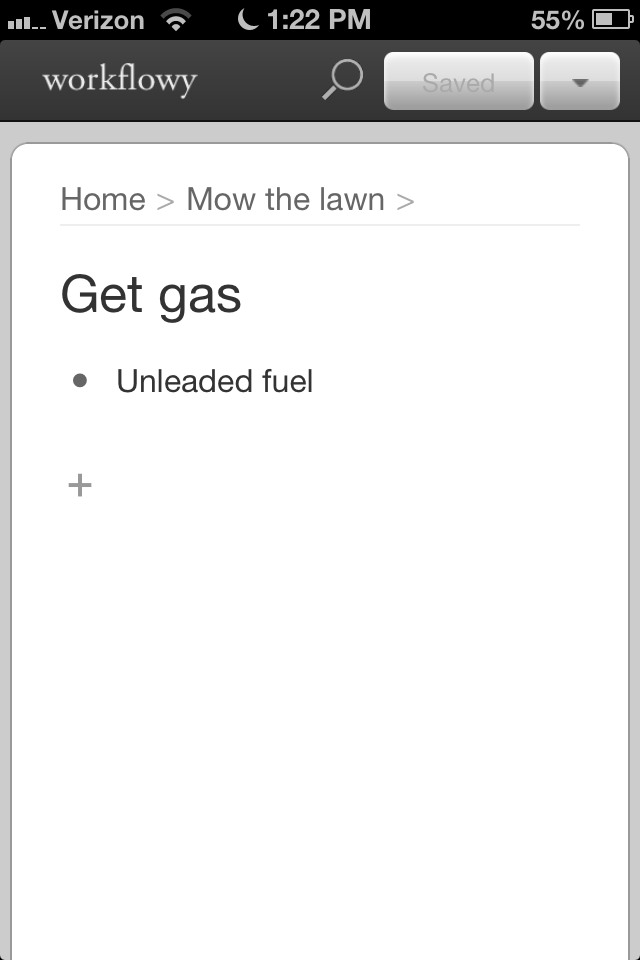
Image

As you can see above I have a list that is titled “Mow the lawn” which is my main task.  A detail for that task would be “get gas” which is indicated on a sub menu.  Then the third task is to get the right gasoline which is indicated in another sub menu.  This app is a great app for keeping your thoughts in line and organized.  This app is also a great tool for note-taking and being able to organize your notes into single subjects. For instance, you could add a list called "mandatory assignments" and then clarify the steps it would take to complete the assignments.

Friday, November 9, 2012

Day 27 - Yash Kamani, Burlington High School Sophomore


MASSCue Reflection
A few weeks ago, we, as members of the BHS student help desk, were presented the opportunity to visit and present at Masscue 2012. This conference was held in the club suites inside Gillette Stadium. The help desk crew got to go down on the 24th to give an hour long presentation on our help desk course and how it works within our school.

Our presentation lasted about an hour in one of the suites on top of Gillette Stadium. We made our presentation a panel discussion type event. At the beginning, our instructors, Mr. Andy Marcinek and Mr. Tim Calvin presented a small keynote to the audience describing the course. The keynote lasted about fifteen minutes and we then made our way into the panel discussion with questions from our audience and answers from us, the students.


The whole event was well organized and the Mass Cue team was very helpful. There were a variety of cool and helpful tools available from different vendors. The event was mainly vendor based with different vendors attempting to sell their ideas, tools or technologies. There were quite a few interesting ideas that I thought would actually be very useful. At the same time there were ideas and tools that seemed unnecessary and costly in any learning environment.

This was my first experience at any education conference of any sort. Overall I really enjoyed it. There was a formal atmosphere at the conference, but the events and people really made it seem casual and comfortable. A Patriots Practice sighting made the day all the more better. I would strongly recommend students attending a Mass Cue Conference sometime in the future for anyone interested in new ideas or technology in the education field.

Thursday, November 8, 2012

Day 26 - Xin Zhang, Burlington High School Junior


Apple is losing it

“Do you want to spend the rest of your life selling sugared water or do you want a chance to change the world?”

That was 1983. There were no iPhones, no iPods, no iPads. Apple was in its 7th year of existence. Steve Jobs wanted to hire John Sculley, then-President of PepsiCo. This was Jobs’ pitch. This was also Jobs’ vision.

In 2012, Apple has officially lost it.

This is not meant to be a diss; the Jobs-led Apple succeeded in changing the world. A decade ago he introduced the iPod, which changed the music business. 5 years ago, not many people had a smartphone in their hands, then came the iPhone and now its the norm. 2-3 years ago, tablets were virtually unknown; now iPads and other tablets are everywhere. That string of ground breaking innovations has stopped following Job’s death, however.

iPhone 5. The new iPad. The new new iPad. iOS 5, 6. Siri. Apple Maps. They’re just not game-changing products. They’re follower products. Not that they’re bad; they’re great little playthings, but it’s just not matching the competition. There’s nothing new anymore, its just minor improvements that other devices already offer for a higher price. Siri and Maps, on the other hand, awful, awful apps.

You have to wonder how long Apple can go on just making incremental upgrades on their existing products. Take a page out of Google’s playbook: they’re doing that and more.
Enhanced by Zemanta

Wednesday, November 7, 2012

Day 25 - Emma Jones, Burlington High School Sophomore


I am a swimmer for the Burlington High School Girls' Swim Team and this year we have been incorporating the use of iPads into our practices. The idea of using iPads during practice was brought to our attention when our coaches discussed what our themes for this year were going to be. Our first theme was unity and we were able to accomplish this through team-building activities such as pasta parties and team sleepovers.

Our other theme was the “science of swimming," a way for each member of the team to develop as swimmers.  In order to accomplish this theme split practices were implemented. Every Wednesday practice was split in with one half of the team practicing for the first 45 minutes and the second group practicing for the last 45 minutes of the practice. During the half of practice where swimmers were not in the pool, we use the iPad video cameras to film our strokes so that we could have a visual of what we were doing correctly and what we need to work on. The ipad’s use during practice has overall proved very helpful and has helped everyone to improve. More advanced swimmer’s have been able to perfect their technique and newer swimmer’s have been able to get the basics down.

Monday, November 5, 2012

Day 24 - Hannah Lienhard, Burlington High School Sophomore


A brief MASSCue Reflection


BHS Help Desk Students at MASS Cue 2012 

MassCUE was personally the first major conference I had been to. Not that it was particularly large, it was merely the first conference I had been to that was almost completely vendor oriented. At BPSCON 2012, we were gearing up for the coming school year by nipping off problems at the bud, where at MassCUE, we were expected to almost sell our concept of a help desk to a large group of teachers.

The idea behind a conference presentation in and of itself was simple enough – to tell a body of people your experience with this particular class, and share our opinion or two about being a student in a 1:1 learning environment. That said – no amount of facts will prepare you for the social interaction segment of an interactive presentation. It is one thing to know the facts as they are, and another to present them in an appealing way that reflects your opinion on the subject, while still remaining professional. To add to this, we chose an open forum, question and answer style of presentation, adding to the pressure of an accurate and informed response.

In general and despite the pressure it was an informative and, dare I say, fun experience. It was fascinating being in a community of educators who, for the most part, just want to enrich the lives and learning of their students. 

Follow me on Twitter

Thursday, November 1, 2012

Day 22 - Jake Moreira, Burlington High School Sophomore


The Importance of Passwords

In class today, the topic of passwords came up and we were talking about how there were 72 different options for a one character password.  I though it was fascinating so I did a blog post on it to share what I found

Everyone in the world has a password whether it is to log in to facebook or to unlock your iPhone. The only thing that is stopping you from identity thieves and hackers is a word or a sequence of numbers.There are 72 options for a one character password, the equation for finding the possibilities of you password is 72 ^ x   and x being the amount of characters in you password. Most of the time the minimum of characters that are required for the password is 6 characters. That means that there are 139,314,069,504 combinations, that sounds like a lot but hackers use multiple computers  and that amount of combinations would not take a very long time. This link explains passwords very well http://www.commoncraft.com/video/secure-passwords 


If you don’t want to watch the video, basically it explains that passwords keep people out that you want out. Your password should not be something close to you like you dogs name or a significant date. Your password should be something like a phrase that is had to figure out. Then you can put  numbers and characters in it to make it harder. An example is “In God We Trust” take the first letters in each word to get IGWT,then make it 1GWT. Then take that and modify it to something like 1GWTfb for facebook and and 1GWTtw for twitter. Passwords are important make sure yours are safe.
Enhanced by Zemanta